| Intermediate Technology Education | Control Technology | Design Stage 2 | Topic 6 | Optional Activity 9 |

Activity title

Connect the Lights to the Controller

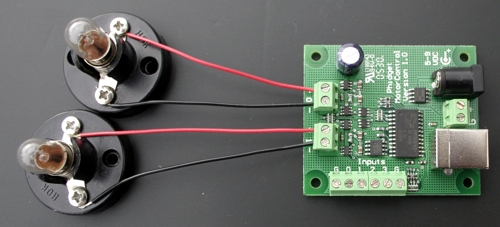
Using a screwdriver, connect a lamp to control output 0 of the Phidget motor controller. Connect a second lamp to control output 1. Make sure the wires are connected correctly. In a later step you will add to this circuit.


Figure Circuit for stage lighting control

Connect the Controller to the Computer

Next plug the USB cable into the Phidget motor controller and into the computer. Have your teacher check that your lamps are wired correctly. Finally connect the power supply to the controller.

Load and Run the Program

Next you will need to load and run a program that will communicate with the Phidget motor controller. Click on the next link and select RUN when the dialog box appears.

Stage Lighting Control

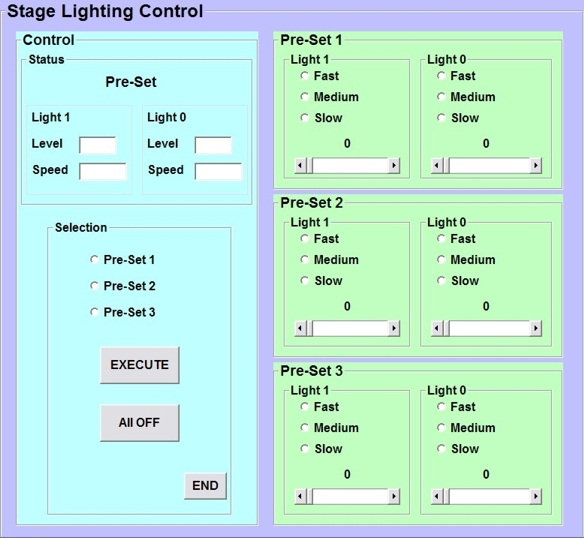
The stage lighting control software has two major control sections and a status display. The right side is used to pre-set the "scene" for the two lights. There are three pre-sets in total. Each pre-set sets the intensity (brightness) and speed at which that intensity occurs. Set all three pre-sets, six settings in all.

On the left side you can select which pre-set to start with and when the execute button is clicked, the lights should light to the desired level and with the selected speed. The current pre-set and its settings are displayed in the status section.

The next pre-set can be selected and when the execute button is clicked, the lights will change to those settings.


Figure Stage lighting control software 

Add Inputs and Test Them

In activity 4, you used the inputs on the Phidget motor controller to activate the turn signals. The stage lighting program also supports the inputs. Input 0 causes Pre-Set 1 to be selected and executed, input 1 selects Pre-Set 2, and input 2 selects Pre-Set 3.

Remember, an input is sensed by the controller when it is connected to ground.

The following image is the wiring diagram. The challenge for you is to make an appropriate circuit out of wires, switches, paperclips, or whatever "stuff"  you can find. Be creative!
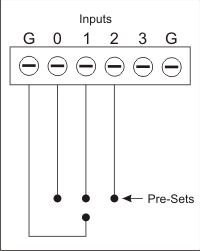

Figure Wiring diagram